
Previewing and Creating Proforma Invoices
Applies to: Advanced Billing
Last updated on Aug 26, 2026
On Relationship Invoicing sites, you have the option to preview what the renewal invoice will look like once it is generated by clicking the button labeled “Preview Proforma” on the Next Billing line. This preview is generated on demand based on the subscription’s current product, components, service credits, prepayments, and coupons, and allows you to quickly review what the customer would see at renewal if nothing changes.
Please be aware that this article is related to Advanced Billing's Subscription Summary function. The subscription summary is the place to perform all tasks necessary to manage customers’ purchases through Advanced Billing.
You can learn more about the Subscription Summary by checking out this help article: Subscription Summary Overview.
Preview a renewal invoice
Click Preview Proforma on the Next Billing line to generate the preview.
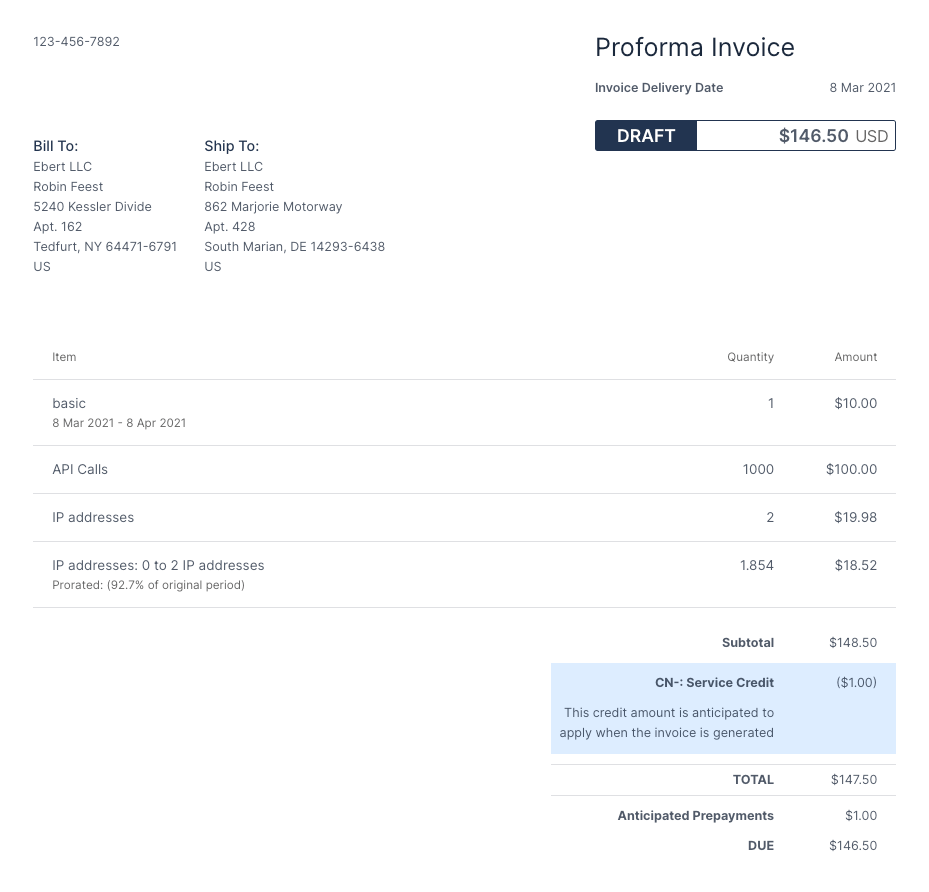
Keep in mind that the proforma preview is not a real invoice, as its line items and their amounts and quantities are subject to change.
If you would like to save the proforma preview or send it to a customer, you may generate a proforma invoice from the corresponding tab on the subscriptions page. For subscription groups, please visit the subscription group page.
How the preview differs from the final invoice
The proforma preview will reflect any current invoice settings as well as translations applicable to the customer’s locale. For example, if the site is configured to hide the “unit price” column and not display a shipping address on invoices, then the proforma invoice will reflect these settings as well.
While the proforma preview will mirror what the customer will see once the final invoice is generated at renewal, for the most part, a few changes have been made for clarity. For example, whereas the renewal invoice will have a payments section, the proforma preview will have an anticipated prepayments section to indicate whether any prepayments are expected to apply towards renewal. It will also have a title of “Proforma Invoice” rather than “Invoice” and an invoice delivery date, which reflects the day when the final invoice will generate.
Customize proforma-specific language
To customize the language of any proforma-specific fields, such as the title and expected delivery date, please visit the Language Settings tab under Config > Settings.
Where the preview is not available
The proforma preview is not available for grouped subscriptions, prepaid subscriptions, subscriptions at an end of life state, or past due subscriptions. Note that past due is a live state rather than an end of life one, so a subscription can be active in every other sense and still not offer the preview. That said, consolidated proforma invoices can be created from subscription groups.
Still need help?
Reach out and our support team will take it from here.