
Reviewing Subscription Activity History
Applies to: Advanced Billing
Last updated on Oct 16, 2026
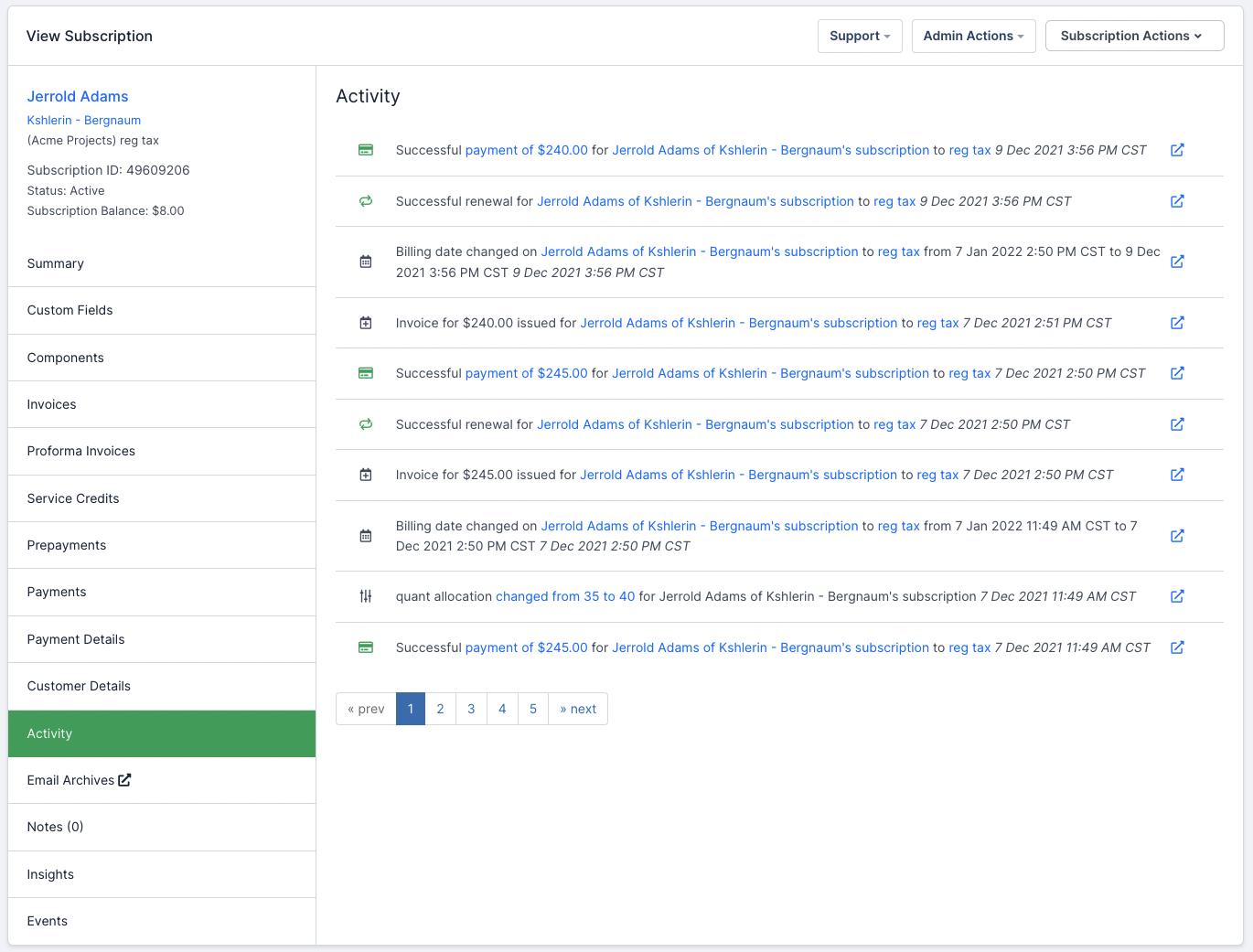
The Activity tab is a window into the recent changes to a subscription — a running, chronological record of what happened to it and when. Use it when you need to establish why a subscription is in its current state: which change was applied, in what order, and on what date.
Where to find it
Click Activity on the side of the subscription summary. Entries are listed newest first, each with a glyph indicating its type and a linked description you can follow through to the record it refers to.
Relationship to site activity
The Activity tab is a replica of what is displayed in site activity, narrowed to this one subscription. The entry types and what each one means are the same in both places, so the site activity documentation is the reference for reading an individual entry.
Use the subscription's Activity tab when you are investigating one subscriber, and site activity when you need to see events across the whole site.
Show attribution
Owners and admins see a Show Attribution button above this tab's entry list. Select it to reveal who initiated each event. For what the actor label shows, where it links, and which events carry no actor at all, see See who initiated an event in the site activity documentation.
Please be aware that this article is related to Advanced Billing's Subscription Summary function. The subscription summary is the place to perform all tasks necessary to manage customers’ purchases through Advanced Billing.
You can learn more about the Subscription Summary by checking out this help article: Subscription Summary Overview.
Still need help?
Reach out and our support team will take it from here.